





Ensures the local daemon is healthy and opens your multi-workspace session inbox and diff reviewer in Safari, Arc, Chrome, or Firefox.
http://127.0.0.1:4200/inbox
H.app · macOS Sonoma 14+ · Apple Silicon
Drag H.app to Applications and open it. The app starts the local H daemon, opens your hiweb session inbox, and lets you install the bundled hi command from the menu bar.
Requires macOS 14.0+ on Apple Silicon (arm64) · Signed .dmg & .app.zip · Bundle ID co.parlant.harness

HApp binary supervises Contents/Resources/harness/bin/h-daemon on ~/.local/share/h and opens http://127.0.0.1:4200/inbox.
The browser workbench
Open the session inbox, read a reply, and send the next message from your browser. These captures show a real H session on desktop and mobile.
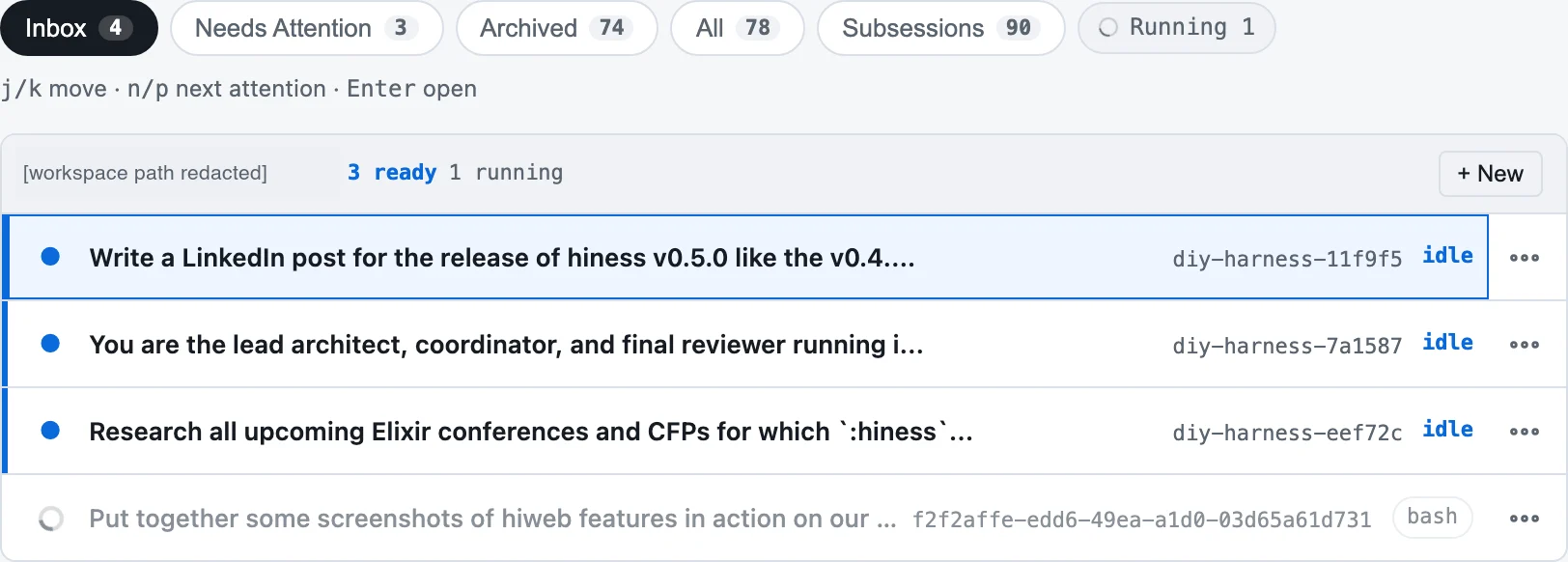
The inbox groups sessions by workspace, with filters for attention, archived work, and running sessions. The workspace path is visibly redacted in this capture.
Open full-size screenshot: Find the next session.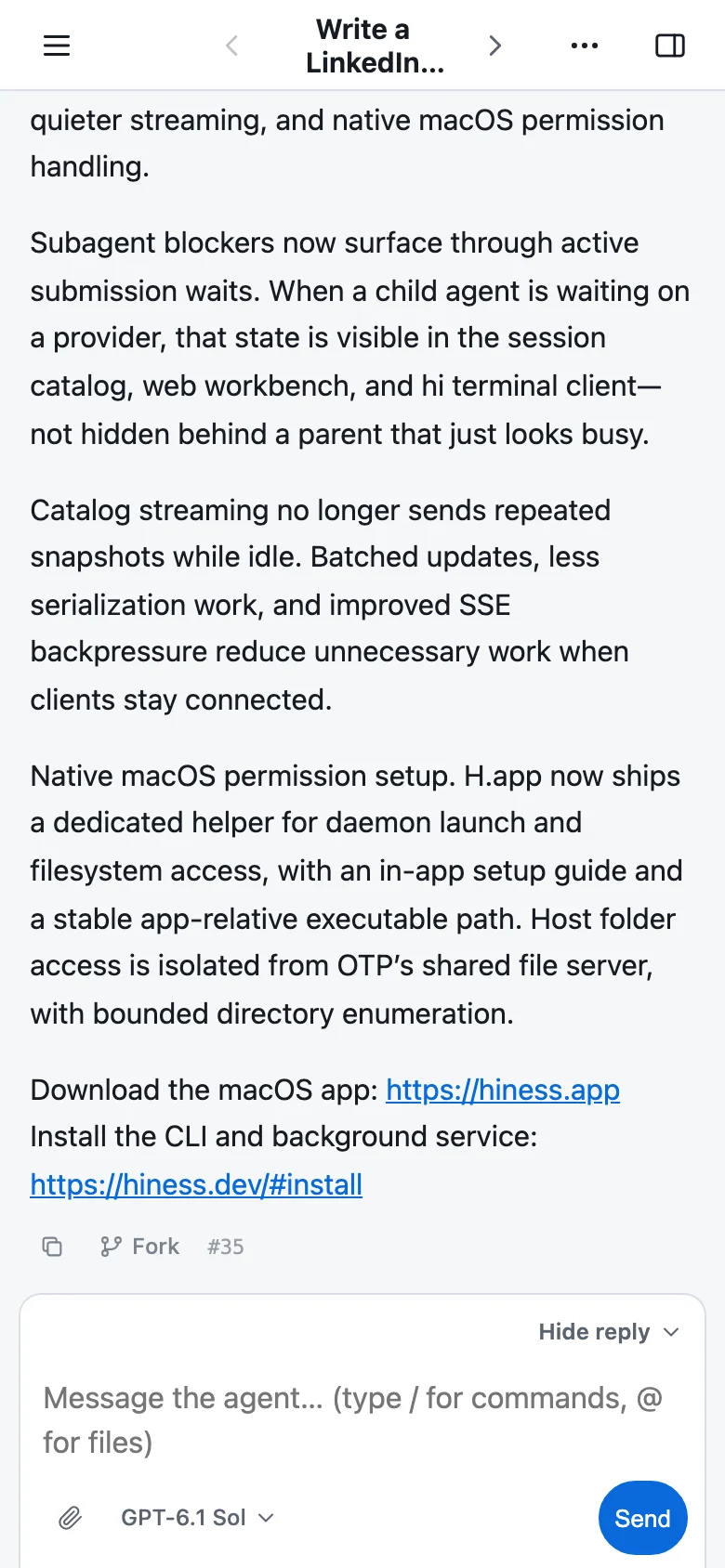
The same session adapts to a narrow browser, with its reply and message composer in one column.
Open full-size screenshot: Read and reply on mobile.
The desktop composer keeps attachments, model selection, slash commands, and file mentions close to your message.
Open full-size screenshot: Send the next turn.Install H.app
Download the signed disk image for drag-and-drop setup into /Applications, unpack the .app.zip archive in dotfiles scripts, run the POSIX LaunchAgent installer, or build H.app locally.
Requires macOS 14.0 (Sonoma) or newer on Apple Silicon (arm64). H.app bundles its own Erlang/OTP 29 runtime and Rust CLI tools inside Contents/Resources/harness.
hi login && hi
Optional Terminal install, quarantine clear & signature check
curl -fLO https://gitlab.com/parlant-co/harness/-/releases/permalink/latest/downloads/H-v0.5.3-darwin-arm64.dmg
hdiutil attach H-v0.5.3-darwin-arm64.dmg -nobrowse -mountpoint /Volumes/H
ditto /Volumes/H/H.app /Applications/H.app
hdiutil detach /Volumes/H
xattr -dr com.apple.quarantine /Applications/H.app
open /Applications/H.app
Verify: codesign --verify --deep --strict --verbose=2 /Applications/H.app && hi daemon status
curl -fLO https://gitlab.com/parlant-co/harness/-/releases/permalink/latest/downloads/H-v0.5.3-darwin-arm64.app.zip
ditto -x -k H-v0.5.3-darwin-arm64.app.zip /Applications
xattr -dr com.apple.quarantine /Applications/H.app
open /Applications/H.app
Link hi and hi-import into ~/.local/bin from a script
mkdir -p "$HOME/.local/bin"
ln -sfn /Applications/H.app/Contents/Resources/harness/bin/hi "$HOME/.local/bin/hi"
ln -sfn /Applications/H.app/Contents/Resources/harness/bin/hi-import "$HOME/.local/bin/hi-import"
Extract with Apple's ditto command so Mach-O code signatures, symbolic links, and extended attributes inside Contents/Resources/harness remain intact, then clear the browser quarantine attribute before first launch.
Verify: /Applications/H.app/Contents/Resources/harness/bin/hi daemon status
curl -fsSL https://hiness.dev/install.sh | sh -s -- --service
hi daemon status
Or use the Mix archive (Elixir 1.20 / OTP 29) and open a session
mix archive.install https://gitlab.com/parlant-co/harness/-/releases/permalink/latest/downloads/h_setup.ez
mix h.setup --service
hi login && hi
Installs ~/.local/opt/harness/current after verifying the OpenSSH Ed25519 signature, symlinks hi and hi-import into the first writable directory on PATH, and registers ~/Library/LaunchAgents/co.parlant.h.daemon.plist. If you also open H.app later, it detects the running LaunchAgent via ~/.local/share/h/daemon.json and attaches without starting a second daemon.
Verify: launchctl print "gui/$(id -u)/co.parlant.h.daemon"
git clone https://github.com/parlant/harness.git
cd harness
scripts/build-bundle.sh dist/bundle-darwin-arm64
H_KEEP_APP=1 scripts/build-macos-app.sh dist/bundle-darwin-arm64 dist/release
ditto dist/release/H.app /Applications/H.app
open /Applications/H.app
Compiles the OTP 29 release, hiweb assets, Rust hi and hi-import binaries, and Swift AppKit launcher (packaging/macos/HApp.swift), signs every embedded dylib, NIF, and executable inside-out, and writes H.app, .dmg, and .app.zip into dist/release/.
Verify: codesign --verify --deep --strict --verbose=2 /Applications/H.app
01 / Native AppKit Menu-Bar Control
H.app runs with LSUIElement enabled so your Dock and application switcher stay clear while you work in Xcode, Neovim, Zed, or Terminal. Every three seconds it inspects ~/.local/share/h/daemon.json and updates the status indicator between H (running) and H· (stopped).
02 / Self-Contained macOS Bundle
Everything H needs to run lives inside H.app/Contents/Resources/harness. Moving H.app or upgrading macOS leaves your sessions, workspaces, and provider credentials untouched in ~/.local/share/h.
H.app/
└── Contents/
    ├── Info.plist              # co.parlant.harness · LSMinimumSystemVersion 14.0 · LSUIElement
    ├── MacOS/
    │   └── HApp                # Native Swift / AppKit status-bar supervisor
    └── Resources/
        ├── AppIcon.icns        # High-resolution macOS icon set
        └── harness/            # Self-contained relocatable OTP 29 + Rust bundle
            ├── BUILD_MANIFEST.json
            ├── bin/
            │   ├── h-daemon    # Local OTP coding-agent daemon + hiweb listener
            │   ├── hi          # Native Rust terminal client
            │   └── hi-import   # Transcript archive importer
            ├── erts-*/         # Embedded BEAM runtime (no Homebrew Erlang needed)
└── releases/ # Compiled :harness + :h_web releaseCompiled directly with swiftc targeting arm64-apple-macosx14.0. Polls daemon.json liveness, streams daemon logs to ~/.local/share/h/h-daemon.log (mode 0600), and adopts external daemons cleanly.
Ships its own Erlang/OTP 29 runtime, Elixir :harness coordinator, Bandit + Phoenix LiveView workbench, and native arm64 Rust terminal binaries with rewritten @rpath dylibs.
Every embedded .dylib, .so NIF, ERTS binary, Rust tool, and the outer H.app bundle is signed inside-out and verified with codesign --verify --deep --strict before packaging.
03 / Terminal and browser clients
One local store under ~/.local/share/h.
Once H.app links hi onto your PATH, any terminal tab in Ghostty, iTerm2, Kitty, or Terminal.app connects to the exact same daemon that powers hiweb. Kick off a refactor from your repository checkout, close the terminal window, and comment on line-pinned diffs in the browser.

News from hiness.app & hiness.dev
H.app integrates Sparkle 2 to check for signed macOS updates automatically, announce new releases gently in the menu bar, display release notes, and cleanly drain the daemon before relaunching. Release notes and signed checksums stay synchronized across both sites.
H.app now checks for signed macOS updates automatically via Sparkle 2, shows release notes in a native update dialog, and drains the bundled daemon before relaunching.
H.app, the macOS disk image, and the app archive are now Developer ID-signed, notarized, and stapled, and launching the web UI from H.app signs you in automatically via a single-use link.
Closing a terminal window or tmux pane no longer leaves orphaned hi processes spinning at 100% CPU.